Why Network Security Is Not Optional for Modern Enterprises
The average cost of a data breach in 2024 is $4.88 million according to IBM's annual Cost of a Data Breach Report. More than 60% of breaches involve network-level vulnerabilities — misconfigured firewalls, flat network topologies, unprotected guest access, and devices speaking freely to each other without any inspection.
UniFi's security capabilities are substantially more advanced than most IT teams realize. The platform includes enterprise-grade intrusion detection and prevention, DNS-based threat filtering, 802.1X port security, sophisticated firewall policy management, and full traffic inspection — all included in the hardware cost with no per-seat subscription.
The UniFi Security Stack
Intrusion Detection and Prevention System (IDS/IPS)
UniFi's Threat Management (powered by Suricata) inspects all traffic passing through the gateway against a continuously updated ruleset of known attack signatures, command-and-control traffic patterns, and malicious payloads. In IDS mode, threats are logged and alerted. In IPS mode, traffic matching threat signatures is dropped automatically.
For enterprise deployments, IPS should be enabled with automatic ruleset updates. Review the Threat Management dashboard weekly — patterns of blocked traffic often reveal compromised devices or active reconnaissance before they become full incidents.
DNS-Based Threat Filtering
Most malware communicates with command-and-control servers via DNS — they resolve a domain name before establishing a connection. UniFi's DNS filter intercepts DNS queries and blocks resolution of known malicious domains, botnet C2 infrastructure, phishing sites, and advertising networks that serve malvertising.
This provides a low-latency, high-efficiency security layer that stops many threats before they can establish any network connection — regardless of whether the target is a managed device or a BYOD phone on the guest VLAN.
802.1X Port and Wireless Authentication
802.1X is the IEEE standard for network access control based on device identity. When enabled on switch ports, any device that plugs into a port must authenticate against a RADIUS server before receiving network access. Unauthorized devices get no connectivity — even if they physically plug in.
On wireless networks, 802.1X provides per-user authentication with dynamic VLAN assignment. Each authenticated user is automatically placed in their appropriate VLAN based on their identity — a guest gets VLAN 40, an employee gets VLAN 10, a contractor gets VLAN 80 — without any manual configuration per device.
Zero-Trust Network Architecture with UniFi
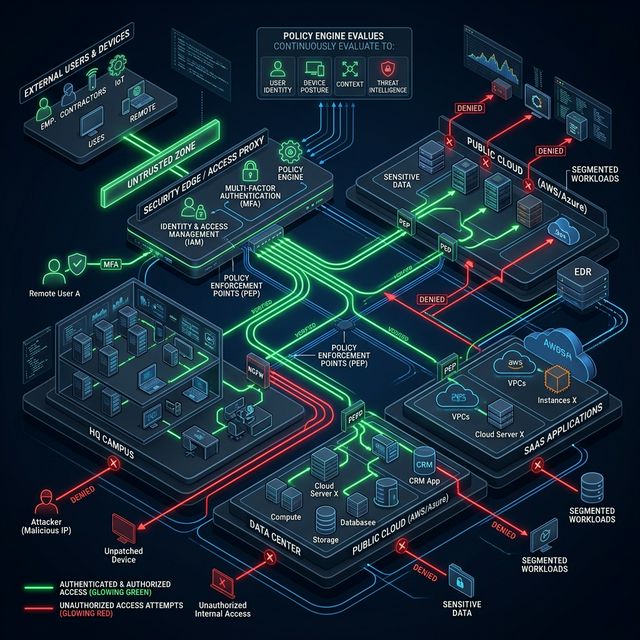
Zero-trust means: trust nothing by default. Every device, every user, every connection must be verified and explicitly permitted. This is the opposite of the traditional 'trusted insider' network model that assumed everything inside the perimeter was safe.
Implementing zero-trust with UniFi includes:
- Network micro-segmentation (VLANs) isolating every device category
- Default-deny firewall rules between all segments
- Application-layer firewall rules permitting only specific ports and protocols
- Device identity verification via 802.1X before network access is granted
- Continuous monitoring with anomaly detection
- Least-privilege network access for all device categories
Protecting Against Insider Threats
The most overlooked enterprise security risk is the insider threat — a disgruntled employee, a compromised account, or a contractor with excessive network access. Network-level controls that limit what any user can reach, combined with logging of all access attempts, dramatically reduce the damage potential of insider incidents:
- VLAN isolation prevents lateral movement between department segments
- Traffic logging to SIEM provides forensic audit trails
- Unusual traffic volume alerts catch data exfiltration attempts
- Time-based firewall rules restrict access outside business hours
Compliance Considerations
For enterprises with regulatory obligations, UniFi's security features directly support compliance frameworks:
- PCI-DSS: Network segmentation isolating cardholder data environments
- HIPAA: Access controls and audit logging for networks handling PHI
- SOC 2: Firewall documentation, change management logging, incident response
- ISO 27001: Network security controls supporting information security management
Frequently Asked Questions
Does UniFi replace a dedicated WAF (Web Application Firewall)?
No. UniFi's threat management and firewall capabilities protect the network perimeter and internal segments. A WAF protects public-facing web applications at the application layer. Both have their place in a comprehensive security architecture.
How do we handle BYOD devices securely?
BYOD should land on a dedicated VLAN with internet access only, separate from corporate resources. With 802.1X, certificates can be distributed to managed devices to distinguish corporate-owned from personal devices automatically, even on WiFi.
Is UniFi IPS effective against zero-day threats?
IPS signature-based detection is effective against known threats with published signatures. Zero-day (novel) attacks may evade signature detection. A layered security approach — DNS filtering, behavioral monitoring, endpoint protection, and network segmentation — provides defense-in-depth against zero-day scenarios.